

When dealing with large amounts of data in Salesforce, loading all records at once can impact performance and user experience. A better approach is lazy loading, where data is loaded incrementally as the user scrolls. In this article we will learn how to implement lazy loading in Lightning Web Components (LWC).
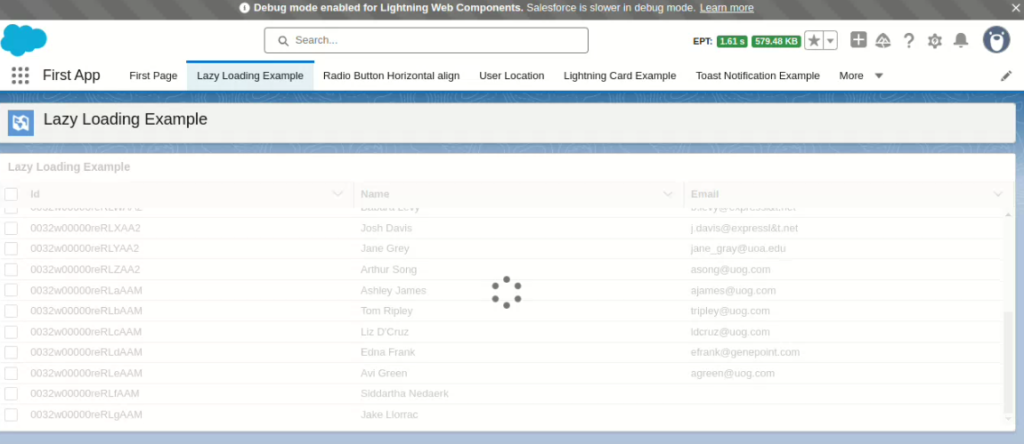
We will develop a Lightning Web Component that displays a few records in a Lightning data table. As the user scrolls, more records will be loaded on the fly. To achieve lazy loading in LWC, we need to use the enable-infinite-loading attribute while adding the Lightning data table to the LWC component and also provide an onloadmore event handler.
Apex Controller
public class LazyLoadingExampleController {
     @AuraEnabled(cacheable=true)
        public static List<Contact> getContacts(Integer recordlimit,Integer recordOffset){
            List<Contact> contactList = [SELECT Id,Name,Email,MobilePhone
                                         FROM Contact
                                         ORDER BY CreatedDate
                                         LIMIT :recordlimit
                                         OFFSET :recordOffset
                                         ];
            return contactList;
        }

        @AuraEnabled(cacheable=true)
        public static Integer getContactCount() {
            return [SELECT COUNT() FROM Contact];
        }
    }
In above apex code we have written 2 Apex method. Let’s understand one by one.
getContacts
- This method retrieves contacts in batches using
LIMITandOFFSET. LIMITcontrols how many records are fetched at a time.OFFSETskips records that were already loaded.
getContactCount
- This method returns the total count of contacts.
- This helps determine when to stop fetching more data.
Lightning Web Component
HTML
<template>
    <lightning-card title="Lazy Loading Example">
    <div style="height: 300px">
        <lightning-datatable
            key-field="Id"
            columns={columns}
            data={data}
            enable-infinite-loading
            onloadmore={loadMoreData}
        >
        </lightning-datatable>
    </div>
    <template if:true={isLoading}>
        <lightning-spinner alternative-text="Loading..." size="medium"></lightning-spinner>
    </template>
</lightning-card>
</template>
- A
lightning-datatableis used to display contacts. enable-infinite-loadingallows automatic loading of more data.- The
loadMoreDatamethod is triggered when users scroll down. - A
lightning-spinneris displayed while data is being fetched.
JavaScript
import { LightningElement,wire } from 'lwc';
import getContacts from '@salesforce/apex/LazyLoadingExampleController.getContacts';
import getContactCount from '@salesforce/apex/LazyLoadingExampleController.getContactCount';

// Define table column structure for displaying contacts
const columnsDefs = [
    { label: 'Id', fieldName: 'Id', type: 'text' },
    { label: 'Name', fieldName: 'Name', type: 'text'},
    { label: 'Email', fieldName: 'Email', type: 'text'}
];

export default class LazyLoadingExampleComponent extends LightningElement {
    data = []; // Stores the contact records
    columns = columnsDefs; // Defines table columns
    limit = 10; // Number of records to fetch per request
    offset = 0; // Keeps track of pagination
    contactCount; // Stores total contact count
    isLoading = false; // Controls loading state

    // Lifecycle hook that runs when component is inserted into the DOM
    connectedCallback() {
        this.loadData();
    }

    // Fetch total number of contacts using wire service
    @wire(getContactCount)
    wiredCount({ error, data }) {
        if (data !== undefined) {
            this.contactCount = data;
        } else if (error) {
            console.error('Error fetching contact count:', error);
        }
    }

    // Fetches contacts from Apex method with limit and offset for pagination
    loadData() {
        return getContacts({ recordlimit: this.limit, recordOffset: this.offset })
            .then(result => {
                let updatedRecords = [...this.data, ...result];
                this.data = updatedRecords;
            })
            .catch(error => {
                console.error(error);
            });
    }

    // Handles infinite scrolling to load more data
    loadMoreData(event) {
        this.isLoading = true;
        this.offset = this.offset + this.limit;

        // Stop loading more data if all contacts have been loaded
        if (this.data.length >= this.contactCount) {
            event.target.enableInfiniteLoading = false;
            this.isLoading = false;
        } else {
            this.loadData()
                .then(() => {
                    this.isLoading = false;
                })
                .catch(error => {
                    console.error(error);
                });
        }
    }
}
- Initial Data Load:
connectedCallback()callsloadData()when the component is initialized. - Fetching Total Count:
wiredCount()gets the total number of contacts. - Appending Data:
loadData()fetches a new set of contacts and appends them todata. - Lazy Loading on Scroll:
loadMoreData(event)increases theoffset.- If all contacts are loaded, infinite loading is disabled.
- Otherwise,
loadData()fetches more records.
Conclusion
This lazy loading approach improves performance and user experience by loading data incrementally. It avoids performance issues related to fetching large datasets at once.
Key Takeaways
- Use LIMIT and OFFSET in SOQL queries to fetch data in chunks.
- Enable infinite scrolling using
lightning-datatable. - Keep track of total records using a count query.
We hope now you will be able to implement lazy loading in Lightning Web Component. If you have any doubts then let us know in the comment section below.
Learn about mixed DML error in Salesforce.
Get started with LWC from here.
2 thoughts on “How to Implement lazy loading in LWC ?”