

In this article, we will learn how to implement pagination in Lightning Web Components (LWC) and Apex. Pagination allows us to load and display a large number of records in manageable chunks, improving performance and user experience.
We will create an LWC that displays a list of Account records from Salesforce in a datatable with “Next” and “Previous” buttons for easy navigation. Let’s understand by looking at the code.
Apex Controller
public with sharing class AccountPaginationController {

    // Fetch paginated records using StandardSetController
    @AuraEnabled(cacheable=true)
    public static List<Account> getAccounts(Integer pageNumber, Integer pageSize) {
        Database.QueryLocator query = Database.getQueryLocator(
            [SELECT Id, Name, Phone, Industry, Type FROM Account ORDER BY Name]
        );

        // Use StandardSetController to handle large datasets
        ApexPages.StandardSetController controller = new ApexPages.StandardSetController(query);
        controller.setPageSize(pageSize);
        controller.setPageNumber(pageNumber);

        return (List<Account>) controller.getRecords();
    }

    // Get total record count
    @AuraEnabled(cacheable=true)
    public static Integer getTotalAccounts() {
        return [SELECT COUNT() FROM Account];
    }
}
The getAccounts method fetches a list of Account records using StandardSetController to control the number of records and pagination.
The getTotalAccounts method returns the total count of Account records to calculate the total number of pages.
Lightning Web Component
HTML
<template>
    <lightning-card title="Account Pagination" icon-name="standard:account">
        <div class="datatable-container">
            <template if:true={accounts.length}>
                <lightning-datatable
                    key-field="id"
                    data={accounts}
                    columns={columns}
                    hide-checkbox-column="true"
                    onrowaction={handleRowAction}>
                </lightning-datatable>
            </template>
            <template if:false={accounts.length}>
                <p class="slds-align_absolute-center">No Accounts Found!</p>
            </template>
        </div>

        <!-- Pagination Controls -->
        <div class="pagination-controls">
            <lightning-button
                label="Previous"
                onclick={handlePrevious}
                disabled={isFirstPage}>
            </lightning-button>
            <span class="page-info">Page {pageNumber} of {totalPages}</span>
            <lightning-button
                label="Next"
                onclick={handleNext}
                disabled={isLastPage}>
            </lightning-button>
        </div>
    </lightning-card>
</template>
- lightning-datatable is used to display Account records in a table format.
- “Next” and “Previous” buttons are added for pagination control.
- If no records are found then it shows a “No Accounts Found” message.
JavaScript
import { LightningElement, track, wire } from 'lwc';
import { NavigationMixin } from 'lightning/navigation';
import getAccounts from '@salesforce/apex/AccountPaginationController.getAccounts';
import getTotalAccounts from '@salesforce/apex/AccountPaginationController.getTotalAccounts';

const PAGE_SIZE = 5;

export default class AccountPagination extends NavigationMixin(LightningElement) {
    @track accounts = [];
    @track pageNumber = 1;
    @track totalRecords = 0;
    totalPages = 0;

    // Define columns for datatable
    columns = [
        {
            label: 'Name',
            fieldName: 'accountUrl',
            type: 'url',
            typeAttributes: {
                label: { fieldName: 'Name' },
                target: '_self'
            }
        },
        { label: 'Phone', fieldName: 'Phone', type: 'phone' },
        { label: 'Industry', fieldName: 'Industry', type: 'text' },
        { label: 'Type', fieldName: 'Type', type: 'text' }
    ];

    // Fetch total number of accounts
    @wire(getTotalAccounts)
    wiredTotalAccounts({ error, data }) {
        if (data) {
            this.totalRecords = data;
            this.totalPages = Math.ceil(this.totalRecords / PAGE_SIZE);
            this.loadAccounts();
        } else if (error) {
            console.error('Error fetching total accounts:', error);
        }
    }

    // Fetch paginated accounts
    loadAccounts() {
        getAccounts({ pageNumber: this.pageNumber, pageSize: PAGE_SIZE })
            .then((result) => {
                // Add account URL for navigation
                this.accounts = result.map((record) => ({
                    ...record,
                    accountUrl: `/lightning/r/Account/${record.Id}/view`
                }));
            })
            .catch((error) => {
                console.error('Error fetching accounts:', error);
            });
    }

    // Handle Next button click
    handleNext() {
        if (this.pageNumber < this.totalPages) {
            this.pageNumber++;
            this.loadAccounts();
        }
    }

    // Handle Previous button click
    handlePrevious() {
        if (this.pageNumber > 1) {
            this.pageNumber--;
            this.loadAccounts();
        }
    }

    // Check if on the first page
    get isFirstPage() {
        return this.pageNumber === 1;
    }

    // Check if on the last page
    get isLastPage() {
        return this.pageNumber === this.totalPages;
    }
}
@wire(getTotalAccounts)is used to Call Apex to get the total number of records.loadAccounts()method Calls Apex to fetch records based onpageNumberandpageSize.handleNext()andhandlePrevious()methods are used to updatepageNumberand refresh data.isFirstPageandisLastPagehelps in disabling buttons when on the first or last page.
CSS
.datatable-container {
    padding: 1rem;
}

.pagination-controls {
    display: flex;
    justify-content: center;
    align-items: center;
    margin-top: 1rem;
}

.page-info {
    margin: 0 1rem;
    font-size: 1rem;
}

lightning-button {
    margin: 0 0.5rem;
}
Below is the screenshot of the Pagination component which we have developed.
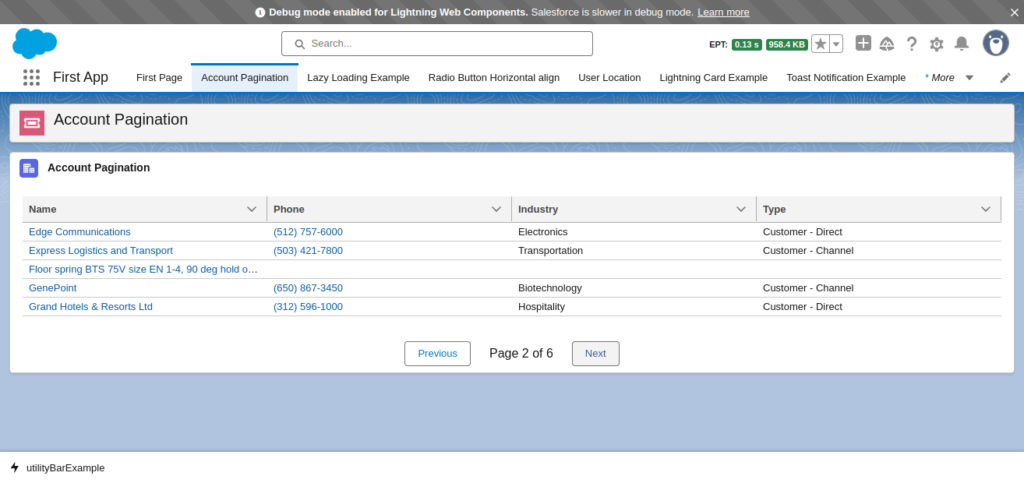
We hope now you know how to implement Pagination in Salesforce using Lightning Web Components. If you have any doubts then let us know in the comments below.
Also read how to resolve mixed dml error in Apex?
Learn LWC from here.